
Imagine you were at the dinner table talking about a topic you’re very passionate about. You shared everything you know, and you poured your heart and soul into your spiel.
But no one was listening. They carried on having their own conversations, and you got no response.
That sucks, doesn’t it?
Same thing happens when you put time and effort into writing a blog post but got rewarded with just a trickle of traffic to your website.
No matter how great your content is, few can benefit from it (and you can benefit very little from the small audience) if you don’t get traffic to your blog.
Over 1 million blog posts are published every day. What can you do to drive traffic to your blog?
Myth: if you build it they will come.
Truth: the most successful bloggers spend 20% of their time producing content and 80% of their time PROMOTING content.
Here’s where content marketing comes in: to promote and distribute your content so you can effectively drive traffic to your blog by getting in front of the right people (your target market) at the right place (where they look for information) and at the right time (when the need it).
In this article, we will look at three main ways you can drive traffic and relevant readership to your blog:
1. Search Traffic
Search Engine Optimization (SEO) is the most used tactic to drive traffic from search engines such as Google, Bing etc.
Keyword research and optimization is the most commonly used tactic – using the terms your target audience types into the search box when they look for information on the internet can help you optimize your content and show up prominently on the search results.
But… if the majority of your competitors are using the same keyword tools, leveraging similar long tail SEO phrases, doing the same research, and getting similar results – what else can you do to stand out?
Here are a few things you can do:
Meta Tag Optimization
Meta tags are snippets of text that describe a page’s content. It appears under the page title in search results:
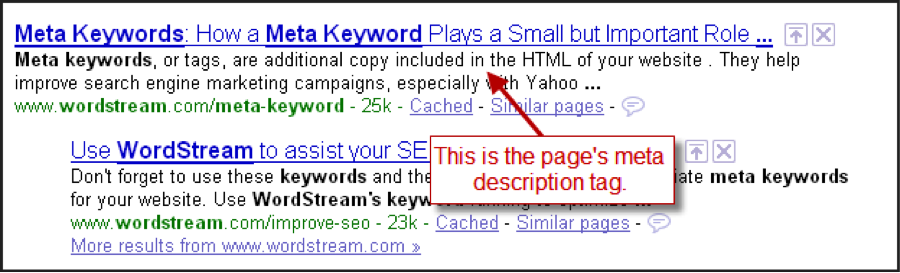
Example of a meta tag and how it displays on Google Search
Image Source: http://www.wordstream.com/meta-tags
You can change the meta description of your blog post from the default first 160 or so characters into a sentence or two that captures your ideal audience’s attention, piques their curiosity, and prompts them to click through.
If you are using a wordpress site, you can install Yoast SEO Plug-in, which allows you to edit the meta tag using the snippet editor on the same page where you enter your content:
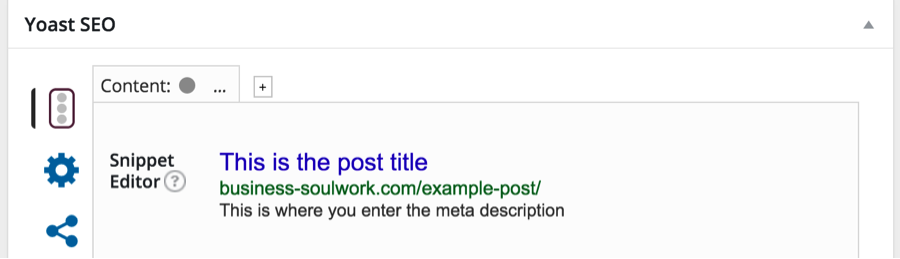
Example of a Yoast SEO snippet editor in WordPress
Mobile-Friendly Site
In April 2015, Google Search expanded its use of mobile-friendliness as a ranking signal.
That means if your website is not optimized for mobile devices, your search engine ranking can be impacted.
Moreover, when visitors land on a website not optimized for mobile devices using their phone or tablets, they may click away without reading your content.
To optimize your website for mobile devices, you need to take into account site design, site structure, page speed, and user experience.
Most WordPress themes are mobile optimized. But if there’s any custom coding it’s worth the effort to conduct thorough testing. This is to make sure your content looks good, usable on most devices, and the website is compatible with all browsers.
Eliminate Duplicate Content
Duplicate content on your website impacts search engine ranking.
You may not have created identical or similar content on your website intentionally; but it may happen due to custom URL parameters, creation of printer-friendly pages, or session tracking.
Use these tools to locate and remedy duplicate content, to avoid being penalized by search engines.
Image Optimization
Images are becoming more important for both improving readers’ experience and social media sharing.
However, if you just stick a picture on your post and call it a day, you are missing out on using images to get more SEO juice. Optimizing your images can give you the extra edge:
- Alt tag, title and file name – search engines use alt tags, titles and file names to “recognize” images on websites. Using alt tags and title attributes with the right keywords can help improve SEO.
- File size – search engines favor faster-loading websites. If you have images with file size larger than necessary for optimal display on screen, you are slowing down your load time for no good reason. Use image editing tools, such as PicMonkey, to optimize image and file size.
Fresh Content
Google’s algorithm places greater emphasis on fresh content.
Posting new articles regularly is for sure a way to stay on top of Google’s radar, but that’s not the only way.
You can regularly revisit existing content and make updates so they stay relevant. Do this by adding links back to existing articles, especially from sites that have a high “freshness score”, signals “relevance” to Google.
2. Content Distribution to the Right Audience
You don’t have to sit tight and wait for Google to find you. Here’s how to proactively put your content in front of your target market and link back to your blog:
Be the Right Person for the Right Audience
Getting to know your target market, what they type into a search box and what makes them click through can inform the type of content you create, as well as the title and meta description of the article.
You may wonder- “How can I stand out and get attention if I share the same audience with other blogs?”
In this age of information overload, people are rarely just looking for cut-and-dry facts. They want to have someone who they trust to filter through what’s “out there” and give them actionable information from a unique perspective that is relevant to them.
By positioning your blog, you can not only get in front of the right people, but also get them to stick around by adding personality, emotional appeal, and relevance.
Social Sharing
Social media has been becoming more prominent in content marketing when it comes to getting content in front of the right audience.
Here are some ways to not only increase your reach via social media but also encourage sharing:
- Include social sharing button on your website – there are many WordPress plug-ins you can use like SumoMe and Shareholic.
- Research and use the appropriate hashtags when sharing on social media to make your content easy to discover.
- Create share-worthy images – most platforms such as Facebook, LinkedIn, Tumblr and G+ pull images directly from the URL posted. Tweets with photos are found to get an upward of 300% increase in engagement. Not to mention image-centric platforms such as Pinterest and Instagram are gaining more prominence in helping businesses reach their market.
- Different platforms, however, require different image sizes for optimal display. In the past, it could lead to a lot of asset product time and effort. Now you can use Canva For Work to create images of different sizes and proportions using the same design.
- Know your audience – select the platforms your target market hangs out on, and post at the times when they are most engaged.
- Get your team on board – have your employees share your content.
- Create “contagious content” by hopping on a current trend, adding actionable information and optimizing “share snippets.”
- Use social content lockers to encourage sharing – your readers can reveal additional content or resources by sharing your post on social media. If they find your content useful, it’s very likely that their friends and followers will share too!
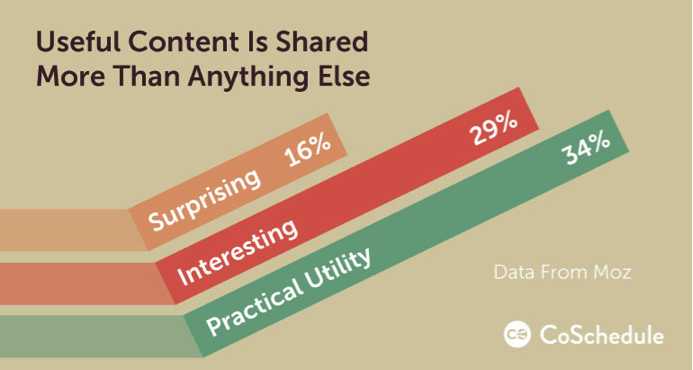
Content that is practical and useful are shared most often.
Image source: http://coschedule.com/blog/how-to-increase-blog-traffic/
Create Native Content for Blogging Platforms
Blogging platforms such as Medium, LinkedIn Pulse and Tumblr can help increase your reach when posted with the right tags and in the right categories.
You can simply cut-and-paste or import your blog articles. But take into account the different nature of these platforms, so it may pay off to tweak the content to cater to the audience.
When you post an article make sure to include links to blog posts on your own website that are relevant and valuable to help drive traffic back to your blog.
You can also include an “About the Author” section at the end of each post to drive traffic back to your blog or opt-in page.
Your Own List (duh!)
Don’t forget your peeps! There is a reason they sign up to join your mailing list – they are very likely to be your ideal audience!
- Send out newsletters on a consistent basis to share links to your blog articles.
- Create a custom audience on Facebook using your mailing list to promote your posts. These folks already know you, and it’s more likely that they will click through and share.
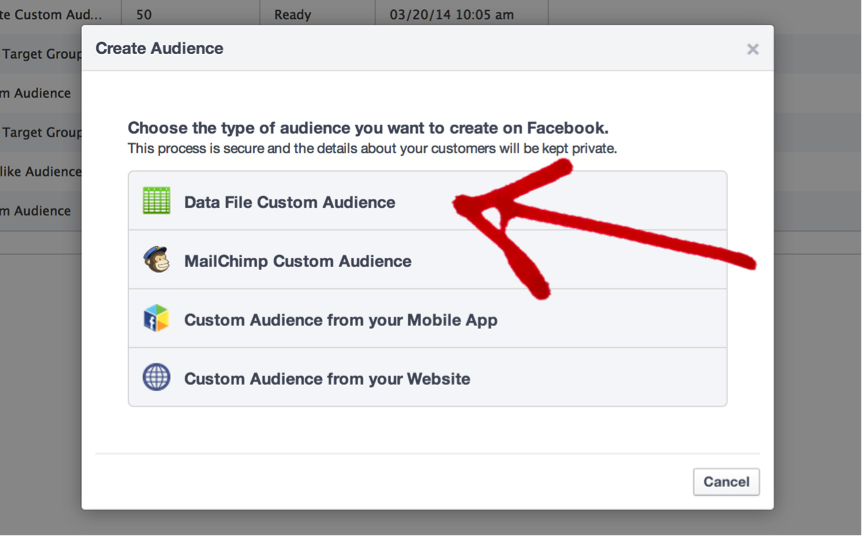
Create a custom audience on Facebook by importing your email list.
Image source: http://socialmouths.com/2014/03/20/target-your-email-subscribers-on-a-faceboo/
3. Outreach and Exposure
It’s nice to have your own sandbox, but if you want to build a bigger castle, you often have to venture out.
What if you don’t have a big following to share your links with? You can “borrow” them from those who do and share a similar audience:
- Commenting on other blogs – When you comment on blogs that share a similar audience, you get exposure to their readers. You want to make sure you are contributing valuable content that showcases your expertise (“hey, nice post” doesn’t cut it.)
- You will be asked to fill out your information such as name, email, and URL when leaving a comment. Do so in a professional manner (no “hellokitty123”!) with your real name. If you have an opt-in landing page, include it in the URL field – once you get people on your list, you can send them content and links to your blog regularly (see above).
- Some blogs use commenting plug-ins such as Disqus or Livefyre, which can link up to your social media profiles. If you choose to do so, make sure the social media profile you link to represent you professionally includes a URL to your blog or opt-in page.
- Same thing with Gravatar – wordpress commenting function can pull your info from Gravatar. If you haven’t already, set up a Gravatar profile with a photo that best represents your brand.
- Commenting on blogs with a good-sized following is also a great way to get the blog owner’s attention and build relationship, which can help you with guest posting, round-up posts, and having them help promote your blog.
- Guest Posting – Writing for websites with a good-size audience similar to your target market can help you reach readers who otherwise would not have come across your work.
- Guest posting is more than just writing an article. If the writing guideline allows, you can put a link or two back to relevant articles on your site. Most blogs will have an author byline at the end of each post. This is where you can include a link back to your blog or opt-inlanding page.
- You also want to help promote the post once it’s live. Having your articles featured on authority sites is a social proof that will add credibility to your work. When you share the link, you can use snipl.y to create a shortlink with a call-to-action added to the bottom of the page. This directs readers to a relevant article on your blog or your opt-in page:
- Round-up posts – Reach out to industry experts and interview them on a specific topic that is of interest to your ideal audience and post it on your blog. When the article goes live, ask your contributors to share the link – 99% of the time they will be happy to give you a shout out or two on social media.
- Ask influencers to share your content – Yep, you gotta ask if you want something! That’s when the work you have done earlier on commenting on other blogs comes in. It’s much easier to reach out when you are already on their radar.
- Content curation – You don’t have to write kick-butt content all the time. In fact, curating and sharing great content from others may be a more efficient way to get exposure. When you link out to a blog post, a “pingback” appears on the comment section of that post, essentially linking your blog to that post and exposing your blog to their readers.
As you can see, there are many creative ways to get your blog in front of an audience without spending an arm and a leg on ads.
The key is to find the right strategies that suit your communication style, and have a thorough understanding of your ideal audience so you can present your content at the right time and the right place to drive traffic back to your website.
Guest post by: Mike is a Digital Marketing professional and currently working as a PR manager at #TruConversion.com He truly loves Online marketing and anything digital. (@mikedan7)